What Is a Car Camera and How Does It Work?
A Car Camera is more than a small lens behind a windshield. It captures changing light and movement, then turns them into video a driver can review. In a dash camera, light passes through the lens and reaches an image sensor. The device’s processor converts that signal into digital frames. Many models save footage to a memory card, often in short repeating clips. A sudden impact may protect a clip from being overwritten, depending on the model and settings.
As Mobileye co-founder and computer-vision researcher Amnon Shashua has emphasized in discussions of vision-based driving systems, cameras provide rich visual information. Put simply, a camera shows detail, while software must interpret it. This is a paraphrase, not a verbatim quotation. That distinction matters. A camera can record a dim road, a bright headlight, or a blurred license plate, but it cannot guarantee that every detail will be clear. Image quality depends on the lens, sensor, mounting position, lighting, and clean glass. Small things matter.
This introduction explains the main Car Camera types, the parts inside them, and how recording and image processing work. It also considers practical limits, including glare, vibration, and obstructed views. Some systems provide driver-assistance alerts, but those alerts can be mistaken. A camera is useful evidence, not an infallible witness. Knowing how it works helps drivers choose suitable equipment, install it carefully, and interpret recordings with reasonable caution.
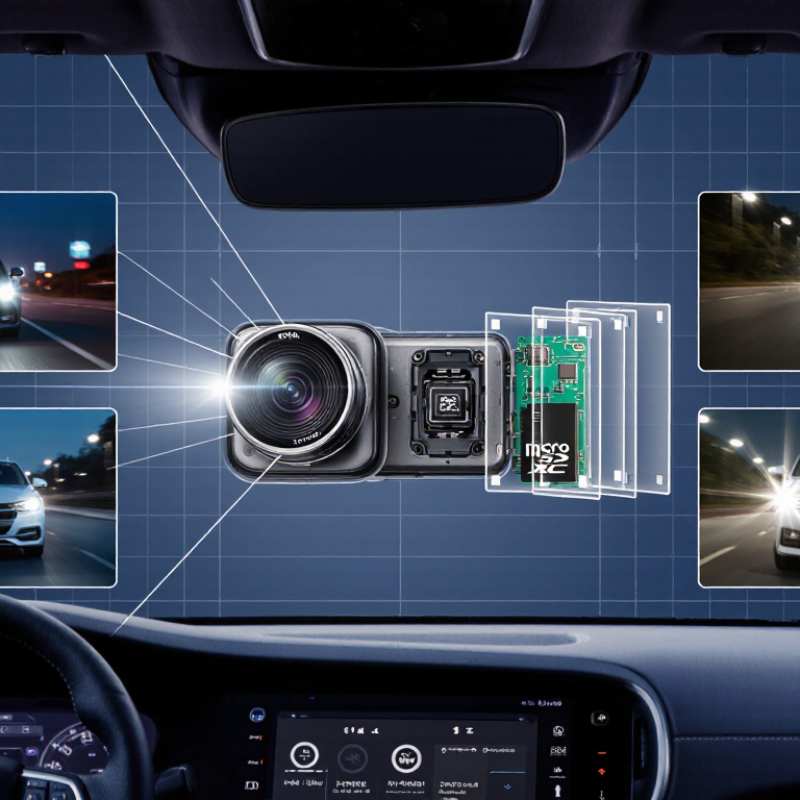
Core Components: CMOS Sensors, 1920 × 1080 Resolution, and Wide-Angle Lenses
A car camera records the road through a lens and turns incoming light into a digital image. Its CMOS sensor contains many light-sensitive pixels. Each pixel measures light, then the camera’s electronics assemble those readings into frames. In a parked car, sensor performance can matter when headlights flare or a dim street hides details. Light matters.
A 1920 × 1080 image contains about 2.1 million pixels. That can show useful details, such as lane markings or the shape of a nearby vehicle, when focus and lighting are good. Resolution alone is not a quality guarantee. A dirty windshield, motion blur, or heavy image compression can soften footage, even at this size. I would not treat the number as a promise of perfect readability.
A wide-angle lens captures more of the scene, including the edges of the road. This can help show a car entering from the side, but very wide views may bend straight lines near the frame’s edges. The camera’s position also matters: a low mount may show more dashboard than road. On a real drive, I’d check the recorded image in daylight and at night, since one test does not tell the whole story. Some edge distortion is simply hard to avoid.
Data Processing: H.264/H.265 Compression and Loop Recording
A car camera does more than capture the road. Its processor encodes each frame into a video file, reducing the data that must fit on the memory card. H.264 is widely used; H.265 can encode similar-looking footage with less data. The ITU-T H.265 Recommendation (2015) describes bitrate savings of about 50% or more compared with H.264 under comparable quality conditions. That matters.
For a practical illustration, an H.264 stream running at 8 megabits per second uses roughly 3.6 decimal gigabytes per hour. If H.265 achieves a similar picture at 4 megabits per second, storage falls to about 1.8 gigabytes per hour. These are bitrate calculations, not guaranteed camera results. Night scenes, fast motion, and fine detail can change file size and image quality. Real footage is messier.
Loop recording saves video in short segments, then reuses space by replacing the oldest unprotected files. A memory card can therefore keep recording without manual cleanup. Event clips may be marked for protection, but protection rules vary, and a full card can still surprise an inattentive driver. Check how the camera handles locked files and storage limits. The detail matters.
Event Detection: How G-Sensors Protect Footage During Sudden Impact
A car camera records the road through a lens and stores video on a memory card. Many models include a G-sensor, which detects sudden changes in motion, such as a sharp jolt or collision. The sensor measures acceleration along different directions. When a reading crosses a set threshold, the camera may mark the current clip as an event file. That matters.
Event detection helps protect useful footage from routine loop recording, which normally overwrites older files as storage fills. Some cameras also save a short period before and after the impact, giving the clip more context. The exact timing and file protection depend on the camera’s design and settings. A pothole or slammed door can sometimes trigger a false event, while a mild impact may not reach the selected threshold. A G-sensor is helpful, but it is not a perfect witness.
Tips: Set the sensitivity for the roads you actually drive. If event files appear after every rough patch, lower the setting; if minor jolts go unmarked, raise it carefully. Check that protected clips are saved, and review the camera’s instructions. Small settings can make a real difference.
What Is a Car Camera and How Does It Work?
Event Detection: How G-Sensors Protect Footage During Sudden Impact
A G-sensor detects changes in a vehicle’s acceleration. In this illustrative sample—not a measured test—the acceleration briefly exceeds a configurable trigger level. When a camera detects a sufficiently sharp impact, it can mark the current recording as an event and protect it from routine loop-recording overwrite. Trigger settings and recording behavior vary by camera.
Power and Storage: 12-Volt Supply, Memory Cards, and Parking Mode
A car camera draws power from the vehicle’s 12-volt system, then converts it to the lower voltage its electronics need. A socket may shut off with the ignition; a hardwired connection can keep the camera running while parked. That difference matters. Parking mode can slowly drain the vehicle battery, so check for a low-voltage cutoff and confirm how the camera is wired. The right cutoff depends on the vehicle and battery condition, not just a number in a manual.
Storage is equally practical. Most cameras record in a loop, replacing older footage unless a clip is locked after an impact. The SD Association’s capacity specifications define SDHC cards as over 2GB through 32GB, and SDXC cards as over 32GB through 2TB. Capacity alone does not guarantee reliable recording. The Association’s Video Speed Class specification sets V30 at a minimum sustained write speed of 30MB/s; still, follow the camera’s stated card requirements. A slow card can interrupt recording. Check it regularly, too. Parking footage may fill a card faster than expected, and a card that looks fine can still fail. I would not treat “supports large cards” as proof that every card will work well.


