Blog
Why Choose a Desk Cable Management Tray for Your Office?
A modern desk may hold two monitors, a dock, speakers, chargers, and a standing-desk controller. Without a clear routing plan, those cables quickly become a tangled safety issue. OSHA’s Walking-Working Surfaces guidance identifies trailing cords as potential trip hazards. The 2023 Gensler Global Workplace Survey also shows that workplace experience strongly affects employee effectiveness and satisfaction. A cluttered workstation can quietly undermine both.
A desk cable management tray offers a simple control point beneath the desktop. It lifts power strips off the floor, separates power and data cables, and leaves a cleaner path for cleaning or maintenance. Cable-management consultant Mark Haskins puts it plainly: “A tidy desk is not the goal; controlled pathways are.” That distinction matters. A tray should support safe routing, not merely hide messy wires.
Good installation requires measurement. Check the desk’s thickness, tray width, mounting clearance, and the power strip’s cable length. Leave gentle loops near movable equipment. Avoid sharp bends and overloaded outlets. Small details matter.
Still, a desk cable management tray is not a complete solution. It cannot fix poor electrical planning, weak adhesive, or an overcrowded workstation. That caveat is easy to miss. The best choice balances load capacity, ventilation, access, and future upgrades. Done properly, the tray turns a distracting cable bundle into a quiet, serviceable system. Imperfect? Sometimes. Better than loose cords underfoot? Usually.
What Is a Desk Cable Management Tray?
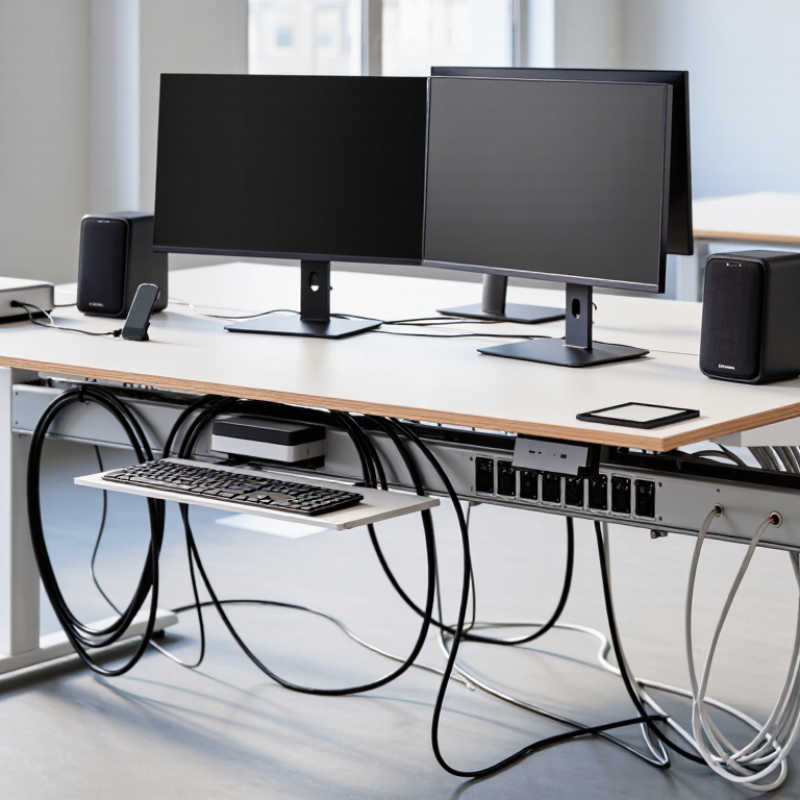
A desk cable management tray is a shallow platform fixed beneath a desk. It holds power strips, adapters, and excess cable length off the floor. Most trays use steel, aluminum, or strong molded plastic. Their open design allows airflow and makes inspection easier. A tray is not the same as a cable sleeve. Sleeves wrap wires together, while trays support the equipment behind them.
In practical use, the tray creates a clear route from the wall outlet to the desktop. I have found that measuring the power strip first prevents awkward overhangs. Leave enough space for plugs and safe ventilation. Screwed trays usually carry heavier loads, while clamp-on models suit rented workspaces. Installers should avoid crushing cables against sharp edges. They should also keep damaged cords out of service.
The main benefit is controlled access. You can trace a monitor cable without lifting the entire desk. The floor stays easier to vacuum, and loose wires become less tempting to pull. However, a tray cannot fix poor cable planning. Too many adapters still create weight and clutter. I once fitted a tray too close to a desk’s rear frame. It worked, but replacing one plug became frustrating. That mistake made the clearance requirement obvious. A useful tray should support maintenance, not merely hide cables.
Why Choose a Desk Cable Management Tray?
A desk cable management tray keeps power, monitor, network, and USB cables organized beneath the desktop. The chart shows typical outside-diameter ranges for common office cables, helping you estimate the space a tray needs to accommodate.
Cable diameters are approximate typical ranges and vary by cable construction, length, shielding, and connector design.
How Does a Cable Management Tray Organize Office Wiring?
Why Choose a Desk Cable Management Tray for Your Office?
A desk cable management tray turns loose wiring into a controlled pathway beneath the work surface. Power cords, monitor leads, and charging cables stay grouped instead of hanging near knees or rolling across the floor. OSHA’s Computer Workstations eTool advises routing cords to reduce trip hazards and improve workspace safety. That guidance supports a simple habit: keep cables elevated, separated, and easy to inspect.
A practical tray usually uses clips, dividers, or a covered channel. Data cables should remain separate from bulky power adapters when space allows. Labeling both ends saves time when equipment moves. The Telecommunications Industry Association’s structured cabling standards emphasize organized pathways, bend-radius control, and serviceability. Still, an overfilled tray becomes another problem. Leave room for one or two future devices, then review the layout every few months. Neat is useful. Accessible is better.
Which Office Problems Can a Cable Tray Solve?
Why Choose a Desk Cable Management Tray for Your Office?
A desk cable management tray solves the everyday disorder beneath a workstation. In a typical office, power cords, monitor cables, and chargers gather in a dusty knot. That mess makes cleaning difficult and hides damaged plugs. A tray lifts cables from the floor and keeps them grouped beneath the desktop. This reduces accidental pulling when someone moves a chair or adjusts a computer.
It also improves maintenance. When each cable follows a visible route, an employee can identify the correct connection faster. This matters during meetings, equipment changes, or sudden power issues. A properly installed tray can support better airflow around adapters and power strips. It may also reduce contact with floor moisture, though it cannot replace electrical safety checks. Keep heavy adapters supported, and avoid overloading any power strip.
The tray can make a small office feel calmer. Loose wires often touch shoes, chair wheels, and cleaning tools. That creates minor interruptions throughout the day. A tray removes several of them. Not every problem disappears. Poorly labeled cables can still become confusing, and an overloaded tray may sag or detach. I have found that simple labels and a little spare space work better than forcing every wire into one narrow channel. Five minutes of routing can save repeated frustration later.
What Features Should You Consider Before Choosing One?
A desk cable tray should solve real problems, not merely hide wires. Measure the desk underside first. Check the tray’s width, depth, and mounting clearance. A narrow tray may force power adapters against the desktop. A shallow tray may leave cables hanging below your knees. Measure twice.
Material matters. Powder-coated steel usually handles heavier adapters than thin plastic. Look for rounded edges, stable brackets, and a stated load capacity. Ventilation is also important near power strips and laptop chargers. OSHA’s computer workstation guidance recommends managing cords to reduce trip hazards. The U.S. Bureau of Labor Statistics recorded over 200,000 private-industry cases involving falls, slips, and trips in its 2023 injury tables. A tray cannot remove every risk, but it can keep loose cables away from feet.
Access deserves equal attention. Choose a design with open sides, removable sections, or flexible cable openings. You may need to replace a charger without dismantling the whole setup. I once selected a tray with excellent capacity but poor access. Dust collected inside, and maintenance became irritating. That choice was wrong. Consider compatibility with surge protectors, docking stations, and thick connector heads. A tray that looks tidy but blocks airflow or bends cables sharply will create new problems. OSHA ergonomics guidance also supports keeping frequently used equipment within comfortable reach, so avoid placing controls too deeply under the desk.
Why Choose a Desk Cable Management Tray for Your Office? - What Features Should You Consider Before Choosing One?
| Feature or Data Dimension | What to Look For | Typical Practical Range | Why It Matters in an Office | Recommended Priority |
|---|---|---|---|---|
| Mounting Method | Choose between clamp-on, screw-mounted, adhesive-mounted, or under-desk rail designs. | Clamp-on: no drilling; screw-mounted: permanent installation; adhesive: light-duty use. | The mounting method affects installation time, desk compatibility, stability, and whether the furniture may be altered. | High |
| Tray Length | Select a length that covers the area beneath the desk without interfering with legs or support frames. | Approximately 40–120 cm for common office desks. | A longer tray can organize more cables, power strips, and adapters, while a shorter tray is easier to fit on compact desks. | High |
| Cable Capacity | Check the usable interior width and depth rather than relying only on the external dimensions. | Light-duty trays: 2–4 cables; medium-duty trays: 5–10 cables; larger trays: more than 10 cables. | Capacity should accommodate power, display, network, audio, and peripheral cables without compressing them. | High |
| Load Capacity | Verify the maximum supported weight, including the power strip and connected adapters. | Many office trays support approximately 3–15 kg, depending on material and mounting method. | A suitable load rating reduces sagging and helps keep heavy power adapters safely supported under the desk. | High |
| Material and Finish | Consider steel mesh, solid steel, aluminum, or reinforced plastic with a smooth, durable finish. | Metal trays generally offer greater rigidity; plastic trays are often lighter and easier to handle. | The material influences durability, weight, ventilation, appearance, and resistance to scratches or corrosion. | Medium |
| Ventilation | Look for perforated or open designs when storing power strips and multiple adapters. | Open or mesh construction allows substantially more airflow than a fully enclosed tray. | Improved airflow helps prevent heat buildup around electrical adapters and power-management equipment. | High |
| Cable Entry and Exit Points | Choose a tray with multiple openings or a continuous open edge for flexible cable routing. | Useful designs provide openings at the front, rear, or both sides. | Accessible openings make it easier to route cables to monitors, computers, chargers, and wall outlets without sharp bends. | High |
| Cable Retention | Check for raised edges, retaining straps, clips, or dividers that prevent cables from falling out. | Basic trays use raised lips; advanced designs may include removable dividers or integrated clips. | Retention features keep disconnected cables organized and make equipment changes less frustrating. | Medium |
| Adjustability | Consider adjustable width, sliding sections, removable dividers, or repositionable mounting points. | Fixed trays provide consistent support; adjustable models accommodate changing desk layouts. | Adjustability is useful for shared workstations, sit-stand desks, and offices that frequently upgrade equipment. | Medium |
| Desk Compatibility | Measure desktop thickness, underside clearance, frame position, and available mounting depth before purchase. | Many clamp systems fit desktops approximately 1–5 cm thick, but the actual range varies by design. | Correct measurements prevent interference with drawers, crossbars, desk legs, and height-adjustment mechanisms. | High |
| Sit-Stand Desk Suitability | Choose a tray that moves with the desktop and leaves enough clearance for cable slack. | Fixed under-desk trays are suitable only when they do not obstruct the lifting frame or moving components. | A compatible design reduces cable tension and prevents cables from catching when the desk changes height. | High |
| Installation and Maintenance | Look for clear instructions, accessible fasteners, smooth edges, and easy cable access. | Installation typically takes about 10–30 minutes, depending on the mounting method and desk structure. | Simple installation and accessible cleaning make the tray more practical for both home offices and larger workplaces. | Medium |
| Safety Considerations | Check for rounded edges, secure mounting hardware, adequate ventilation, and sufficient clearance from moving parts. | The tray should not pinch cables or place excessive weight on plugs, sockets, or desk components. | Safety-focused construction helps reduce trip hazards, cable damage, accidental disconnections, and heat-related concerns. | High |
| Office Appearance | Match the tray color and profile with the desk while keeping cables hidden from normal viewing angles. | Low-profile black, white, silver, and neutral finishes are commonly suitable for professional workspaces. | A tidy cable layout creates a cleaner visual environment and makes shared workstations easier to maintain. | Medium |
| Best Use Case | Match the tray type to the number of devices, desk design, installation restrictions, and expected future changes. | Small trays suit single-monitor setups; larger mesh trays suit multi-device workstations. | Choosing according to actual equipment needs avoids wasted space, overloading, and unnecessary installation complexity. | High |
Note: Capacity, load limits, compatible desk thickness, and installation time vary by tray construction and mounting system. Always confirm the product specifications and measure the desk before installation.
How Can You Install and Maintain a Desk Cable Tray?
A desk cable tray keeps chargers, monitor wires, and power cords below the work surface. Installation is easier when you measure the desk underside first. Check its width, thickness, and clearance around drawers. Mark the mounting points with a pencil. Keep the tray slightly behind the desk edge, so your knees will not hit it.
Use screws suited to the desk material, and avoid overtightening them. A pilot hole can prevent splitting in wooden surfaces. For laminated desks, drilling slowly helps reduce chipping. Route the power cable separately from smaller data cables when possible. Leave a small service loop near each device. This makes future adjustments less frustrating. I once installed a tray too close to a leg, and the cable bent sharply. The mistake was obvious only after everything was connected.
Tips: Group cables by destination, not just by appearance. Add soft ties instead of tight knots. Keep adapters stable inside the tray. Do not overload it. Check the screws and cable tension every few months. Dust can collect beneath the tray, so wipe it with a dry or slightly damp cloth after disconnecting equipment. Inspect damaged insulation immediately, even if the device still works. A tidy setup is useful, but easy access matters more than perfect symmetry.
Related Posts
-
Top 10 Best Electrical Cable Trays for Efficient Cable Management in 2023
-
How to Choose the Right Floor Cable Tray for Your Needs?
-

Top Metal Cable Tray Manufacturers in China to Buy From?
-

Essential Tips for Choosing Cable Tray Systems for Projects?
-

5 Best Reasons to Choose Tray Cable for Your Next Project
-

Essential Tips for Installing Cable Tray Wire Efficiently and Safely
Exclusive Access
Unlimited Resources
Detailed information on our products to assist you with the planning of your cable management project
Register Now